Samsung Gallery Sync Now Backs Up Photos to Google Storage on One UI 9
Samsung has detailed Gallery sync with Google storage, its OneDrive replacement for Galaxy phones and tablets on One UI 9, complete with a new Free up space tool.
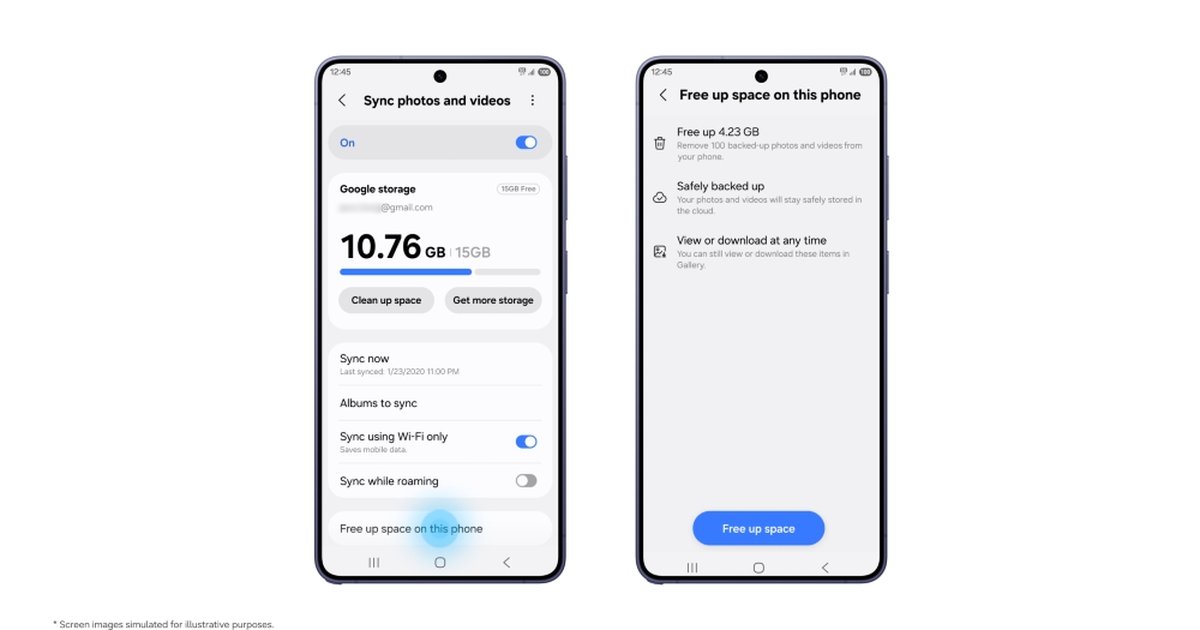
Samsung has officially detailed Samsung Gallery sync with Google storage in a newsroom post dated 10 November 2026. The feature backs up photos and videos from the Gallery app to your Google account on select Galaxy phones and tablets running One UI 9, and it costs nothing extra beyond Google's standard 15GB of free storage.
This is the replacement for the old OneDrive link. Samsung's own FAQ confirms that direct sync between Gallery and Microsoft OneDrive ended on 30 September 2026, so Galaxy owners have spent roughly six weeks without a built-in cloud option in the stock photo app.
How Samsung Gallery Sync Works
If your phone already has a Samsung account and a Google account signed in, there is no new cloud account to create. You turn it on from the Cloud icon in Gallery, from the "Get started" tip card, or by opening Gallery Settings and switching on "Sync photos and videos".
Once it is running, anything you shoot on your Galaxy phone can show up in Gallery on a Galaxy tablet, as long as both devices use the same Samsung and Google accounts and have sync enabled. On a new Galaxy phone, you see previews of your library straight away and download only the originals you actually need.
Key Facts at a Glance
- Announced: 10 November 2026, Samsung Global Newsroom
- Software: select Galaxy phones and tablets on One UI 9, with more devices added in phases
- Storage: your Google account quota, shared with Gmail, Google Drive and Google Photos (15GB free, more via paid Google One plans)
- New tool: "Free up space" deletes synced originals from the device but keeps thumbnails in Gallery
- Replaces: OneDrive Gallery sync, which ended on 30 September 2026
The Catches You Should Know
Deleting a synced photo in Gallery also deletes it from Google storage and from every other Galaxy device linked to the same accounts. That is how most sync services behave, but it is easy to forget when you are clearing out a camera roll.
At launch, Gallery only shows items synced through Gallery itself. Photos already sitting in your Google account from earlier backups stay in the cloud but will not appear in Gallery automatically. Samsung's support pages also state that Google Workspace accounts and supervised child accounts cannot use the feature, and availability varies by market.
The 15GB limit is the real squeeze. It is shared with your email and Drive files, so a heavy shooter on a Galaxy S26 Ultra will hit the ceiling fast. Compared with the old OneDrive link, the big change is that you no longer need a Microsoft account at all; your Google sign-in is enough.
Google-side changes are reaching Galaxy phones from another direction too; see our coverage of the November 2026 Google System Updates.
Our Opinion
This is a sensible fix for a gap Samsung created itself. Ending OneDrive sync on 30 September and only explaining the Google replacement on 10 November left Galaxy owners guessing for weeks. The new setup is simpler, because nearly every Galaxy phone already has a Google account signed in, and the "Free up space" tool is genuinely useful on 128GB models. The trade-off is storage: 15GB shared with Gmail and Drive will not last long, so many people will end up paying for Google One. We also wish Samsung would show older Google Photos backups in Gallery from day one. If you are on One UI 9 and have no cloud backup right now, turn it on; just watch your quota.
Have you switched on Gallery sync yet, or are you sticking with Google Photos? Tell us in the comment section below, and stay tuned to Phone Opinions for more Samsung updates.
Source: Samsung Global Newsroom, Android Headlines
FAQ
Which phones support Samsung Gallery sync with Google storage?
Select Galaxy phones and tablets running One UI 9 support it now, and Samsung says more devices will be added in phases. Availability also depends on your market.
Is Samsung Gallery sync free?
Yes, it uses your existing Google account storage, which includes 15GB free shared with Gmail, Drive and Google Photos. Extra space requires a paid Google One plan.
What happened to OneDrive sync in Samsung Gallery?
Direct sync between Samsung Gallery and OneDrive ended on 30 September 2026. Files already uploaded remain available in the OneDrive app and website.